


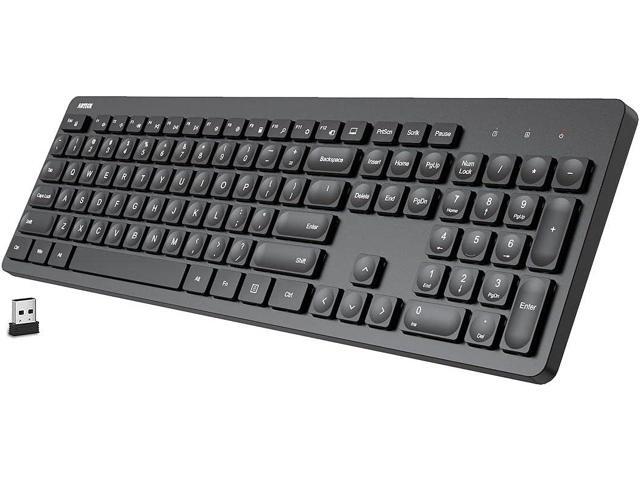
When you’re in the market for a new keyboard, you may encounter various options, but one of the most common types is the full size keyboard. Whether you’re a gamer, writer, or someone simply looking to replace their old keyboard, understanding the structure and layout of a full-size keyboard is crucial. This beginner’s guide will walk you through the essential aspects of full-size keyboards, their layout, and how they compare to other keyboard types.
What is a Full-Size Keyboard?
A full-size keyboard is the standard, traditional keyboard layout that you’ll typically find in most desktops and laptops. It usually includes the alphanumeric keys, function keys (F1-F12), arrow keys, and a numeric keypad. The defining feature of a full-size keyboard is the inclusion of the number pad on the right-hand side, making it larger than compact or tenkeyless (TKL) keyboards.
Key Features of a Full-Size Keyboard
- Alphanumeric Section: The standard QWERTY layout for letters, numbers, and punctuation marks.
- Function Keys: These keys (F1 to F12) are used for shortcuts or special commands in various software.
- Arrow Keys: Located at the bottom-right, these keys allow for easy navigation through text or files.
- Numeric Keypad: A separate set of keys for quick number entry, which is especially useful for data entry or calculations.
Why Choose a Full-Size Keyboard?
For beginners, a full-size keyboard is often the most straightforward choice because it provides the most complete set of features. Here are some reasons why you might opt for a full-size keyboard:
1. Comprehensive Functionality
The inclusion of the numeric keypad makes it ideal for people who frequently input numbers, such as accountants or data analysts. If you’re someone who regularly uses spreadsheet software or does a lot of calculations, having the numeric keypad on hand can significantly improve your productivity.
2. Comfort and Familiarity
Most users are familiar with the full-size keyboard layout, as it’s the standard design found in most computers and devices. If you’re switching from a laptop or an old desktop, sticking with a full-size keyboard makes for an easier transition.
3. Ideal for Typing and Gaming
For typists and gamers alike, the full-size keyboard is a great choice. Typists benefit from the full range of keys for their typing work, and gamers appreciate the added number pad for specific key mappings and shortcuts.
Key Layouts of Full-Size Keyboards
While all full-size keyboards have the same essential structure, there can be minor variations in the key layout depending on the manufacturer and region. Here are some key differences to consider:
1. ANSI vs. ISO Layout
- ANSI Layout: Most commonly used in the U.S., the ANSI layout features a rectangular Enter key and a shorter shift key.
- ISO Layout: Common in Europe, the ISO layout includes a vertical Enter key, a smaller left Shift key, and an extra key between the left Shift and Z.
2. QWERTY vs. Alternative Layouts
The most common keyboard layout is QWERTY, but there are also other layouts like DVORAK or COLEMAK designed to optimize typing speed and comfort. However, these layouts are less widely adopted, and finding a full-size keyboard with these configurations can be challenging.
3. Wireless vs. Wired
Full-size keyboards come in both wired and wireless variants. Wired keyboards tend to be more reliable in terms of input response, while wireless keyboards offer more flexibility in terms of desk setup and mobility.
Benefits of Understanding Full-Size Keyboard Layouts
Being familiar with a full-size keyboard and its layout provides many advantages. By knowing where everything is located, you can type faster, navigate more efficiently, and customize your setup based on your needs. For instance, certain keys in the function row can be mapped for specific software or gaming commands, which can improve your workflow or gaming experience.
Customization and Key Remapping
Some full-size keyboards offer advanced customization options through software, allowing you to reassign keys to suit your preferences. Whether you’re adjusting key sensitivity or changing the layout, this flexibility can make a big difference in your typing or gaming performance.
Full-Size Keyboard vs. Other Keyboard Types
If you’re still deciding between a full-size keyboard and other types, here’s how it compares to the tenkeyless (TKL) and compact keyboard layouts:
- Tenkeyless (TKL) Keyboards: These keyboards omit the numeric keypad, making them more compact and easier to transport. However, they may not be ideal for users who need the number pad for work.
- Compact Keyboards: Even more compact than TKL models, compact keyboards remove not only the number pad but also some other keys, like the function row. These keyboards are great for portability but sacrifice some convenience for regular use.
Conclusion
In summary, a full-size keyboard is an excellent option for beginners who want a reliable, versatile, and familiar layout. Whether you’re typing, gaming, or working with numbers, understanding the full-size keyboard and its layout will allow you to maximize its potential and tailor it to your specific needs. By choosing the right layout and configuration for your work style, you can improve both your productivity and comfort.
